
How to reply Facebook comments from email
5:07 AM // 0 comments // mmigo // Category: how to , internet //
If you an active Facebook users, you would understand that effort required to each time login into Facebook account and then add reply to comments. From now on, there is not need to login into Facebook account for replying to comments. You can automatically publishreply to comments by replying to comment notification email from your email inbox.
Reply Facebook comments through email
1. Goto Account Settings > Notifications tab and enable email notification for comments. Then you will start receive emails for new comments on Facebook account.
2. Open comment notification email and click Reply button.
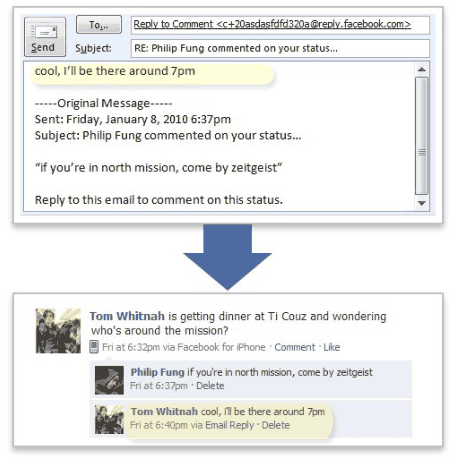
3. Type your “reply” comment at the top of the received email and click Send button. Your reply to specific comment will be automtically published on Facebook. [see screenshot, via FacebookBlog]
SHARE IT WITH YOUR FRIENDS...


Related posts :
0 comments for this post
Leave a reply

Subscribe to ALL2KNOW
Receive New Articles As They are Posted

Followers


 2008 - 2009 SimplexDesign. Content in my blog is licensed under a Creative Commons License.
- Powered by Blogger.com.
